



Restaurant labor management is the process of scheduling, deploying, and optimizing staff so that the right people are in the right place at the right time, at a cost the business can sustain. When it works, guests are served well and labor lines are met. When it does not work, managers spend their shifts buried in spreadsheets, staring at last week’s numbers, and reacting to problems that a better system would have predicted days earlier.
The question facing most multi-unit operators right now is not whether to manage labor more precisely. It is whether the technology they have actually helps their managers do that, or just gives them more screens to stare at.
The Problem: Your Manager’s Office Is Not Where the Business Lives
Ask any experienced multi-unit operator where restaurant performance is actually made or broken, and they will tell you the same thing: it happens on the floor. In the dining room. At the prep station. In the 30 seconds between a guest walking in and a team member making them feel welcome or ignored.
But walk into the back office of most restaurants before a lunch rush and you will find a manager with three browser tabs open, a printed labor report from last Tuesday, and a schedule that has not been touched since it was copied from the week before.
That is not a manager failing at their job. That is a system failing the manager.
The tools that were supposed to simplify labor decisions have, in many cases, just added more complexity. More platforms. More logins. More data without direction. The result: managers spend time analyzing the past instead of preparing for what is about to happen.
AI’s Real Restaurant Impact: From Data Chaos to Smart Decisions. Read more here.
ClearCOGS Is Changing Where That Time Goes
ClearCOGS is an AI-powered forecasting and operations platform built for multi-unit restaurant operators. Our system tells your team exactly what to prep, how much to order, and now, how to staff, down to the 30-minute window, for every location, every day.
The goal has always been the same: if everyone in your organization just knew the future, they would operate more efficiently and make more money. For a line cook, that future is the next 30 minutes. For a GM, it is tomorrow. For an area manager, it is next week. ClearCOGS gives each level of your organization the specific visibility they need to act confidently, not reactively.
That includes labor.
Why Labor Forecasting Is Different From Scheduling
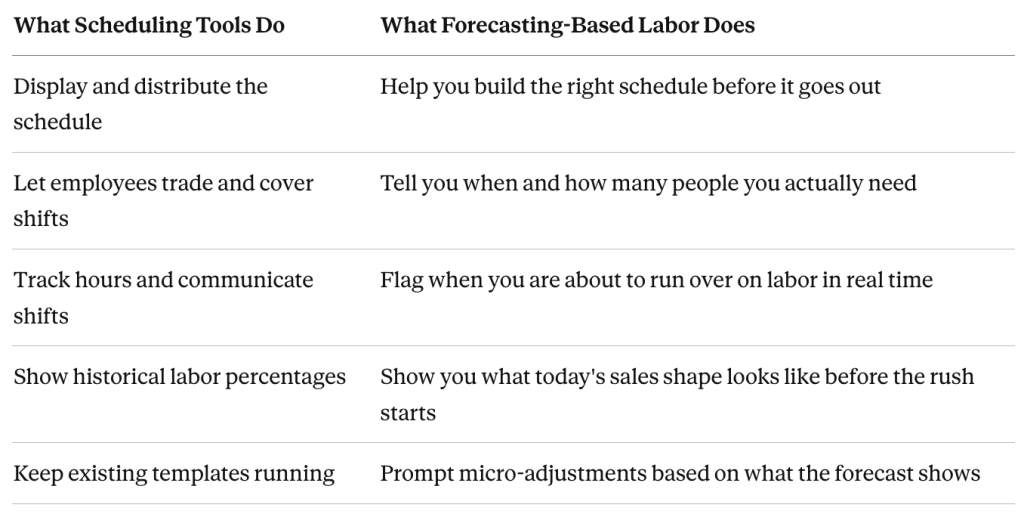
Most scheduling platforms solve a communication problem. Employees can see their shifts, trade with each other, and send messages through the app. That part works fine.
What they do not solve is the prediction problem: How many people do I actually need? When does my rush start? How long will it last? Where am I burning labor dollars on overstaffed slow periods?
This is the distinction that matters. A scheduling tool helps your manager communicate a schedule. A forecasting-based labor tool helps your manager build the right schedule in the first place.
Read More: How AI-Powered Restaurant Forecasting Is Revolutionizing Multi-Unit Operations
What “Knowing the Shape of the Day” Actually Means in Practice
Here is the core concept behind how ClearCOGS approaches labor: every rush period comes down to three questions.
- When does the rush start?
- How high does it peak?
- When does it cool off?
If your manager knows those three things the morning of, or better yet the night before, they can make small, smart adjustments to the schedule instead of making a guess or running the same template they used two weeks ago.
A Tuesday with a 10:00 AM rush looks very different from a Tuesday with a 10:45 AM rush. If your manager cannot see that difference, they cannot staff for it. If they can see it, they can make a simple change: bring someone in 45 minutes later, cut someone 30 minutes earlier, and shift a prep block to take advantage of the lull.
Those micro-adjustments, made consistently, add up. They are also the kind of decisions that should take a manager five minutes, not 45.
The Real Cost of a Manager Stuck in Spreadsheets
When your GM is pulling reports, cross-referencing labor data, and building out a schedule from scratch every week, here is what else is not happening:
- Guests are not being greeted or checked on by a visible leader
- New team members are not getting floor coaching and real-time feedback
- Service issues are being flagged later, not caught in the moment
- Training initiatives from corporate are waiting for a manager who has time
- The manager herself is burning out faster than she needs to be
None of this shows up on a labor percentage report. But it costs you every day.
The operators who get this right are the ones who have decided that their managers’ most valuable hours are on the floor, with the team and the guests, and that back-office work should take as little time as possible to get right.
Is ClearCOGS Right for Your Restaurant Group? Get your answers here.
Location Is Not an Excuse, It Is a Variable
One of the most common gaps in off-the-shelf scheduling tools is that they treat all locations the same. But a location on a college campus runs differently from one in a shopping mall. A restaurant on a high-traffic lunch corridor has a completely different daypart pattern than one that does its volume at dinner.
Smart labor management has to account for this. The optimal prep window at one location might be early morning with lower-cost part-time labor. At another, it might be mid-afternoon after the lunch rush clears. Knowing which is true at each location, and planning schedules accordingly, is not something a template can tell you.
ClearCOGS builds location-level models that take into account your specific sales patterns, local events, weather, loyalty program activity, and limited-time offers. When a promotion hits, the model knows. When a high school football game is happening two blocks away, the model knows. That specificity is what makes a forecast usable, not just interesting.
A Real Scenario: Two $2,400 Days That Look Nothing Alike
Consider two days at the same location. Both land at roughly $2,400 in sales. Both technically hit the daily target.
But on one of those days, sales per labor hour was 91. On the other, it was 67. Same revenue. Completely different experience for the team, and completely different stress load for the manager trying to hold it together.
If all you see is the daily number, both days look fine. If you can see the shape of each day, the peaks and the valleys, the moment it got overwhelming and why, you can start building schedules that prevent the 67 and replicate the 91.
That is what visibility into labor actually looks like in practice. Not a single percentage. A picture of the day.
Where Prep and Labor Connect
Most operators manage prep and labor as separate problems. ClearCOGS treats them as one.
If you know what you are going to sell, you know what you need to prep. If you know what you need to prep, you know when that prep work needs to happen. And if you know when it needs to happen, you can schedule the right people, at the right cost, to get it done.
For operators who run locations with access to lower-cost labor during evening hours, this creates a real opportunity. Shift the prep-heavy work to a window where high school workers are available, willing, and cheaper. Reserve your experienced morning staff for the guest-facing hours that actually drive retention and reviews.
That kind of shift does not happen from gut feel. It happens when you have the data to back the conversation with your managers and make the case clearly.
What AI-Driven Labor Looks Like for Your Team
Here is what a day looks like when your labor tool is working for your manager rather than against them.
Step 1: The night before. The manager reviews the next day’s forecast in ClearCOGS. It shows the predicted sales shape, the expected rush window, and a recommended staffing pattern based on what the data shows. Any adjustments take five minutes, not 45.
Step 2: Opening. The manager does not need to pull reports or rebuild a decision. The prep sheet and the staffing picture are already aligned. She briefs the team and gets on the floor.
Step 3: During service. A live dashboard, visible on a tablet in the back or on a screen in the kitchen, flags when labor is trending toward overage. The manager can act now, not after close when the damage is already done.
Step 4: After service. Automated reporting shows how the day actually went versus what was forecast. Labor hours, sales per labor hour, and prep performance all in one view, without anyone running a report manually.
Step 5: The next planning cycle. That performance data feeds back into the model. The forecast gets better. The schedules get tighter. And the manager spends a little less time in the back office each week.
The Checklist: Is Your Current Labor Tool Actually Working?
Before your next tech stack review, run through these questions honestly.
Is your labor tool giving you:
- A daily sales forecast by 30-minute increment before the day starts
- A recommended staffing plan tied to that forecast, not just to last week’s schedule
- Real-time alerts when you are approaching a labor threshold
- Location-specific models that account for your actual traffic patterns
- Integration with your prep planning so labor and food cost decisions are aligned
- Automated reporting that does not require someone to manually pull and format data
- A way to evaluate whether a shift change actually worked
- If you checked fewer than four, your managers are doing work that technology should be doing for them.
Key Takeaways
- Restaurant managers create the most value on the floor, with their teams and guests, not in the back office reviewing spreadsheets.
- Most scheduling tools solve a communication problem. They do not solve the prediction problem of knowing how many people to have, when, and where.
- Knowing the shape of a day, when the rush starts, how high it peaks, and when it falls off, allows managers to make small adjustments that compound into real labor savings.
- Prep planning and labor planning are the same problem. Connecting them creates scheduling decisions that are grounded in what you are actually going to sell.
- Location-level forecasting accounts for the real variables that templates ignore: traffic patterns, local events, daypart mix, and labor availability windows.
- The right labor tool should reduce the time a manager spends on back-office work, not add to it.
Frequently Asked Questions
How is ClearCOGS different from our current scheduling platform?
Most scheduling platforms are built to distribute and manage the schedule after you have decided what it looks like. ClearCOGS is a forecasting platform that tells you what the schedule should look like before you build it, based on what you are actually going to sell that day and that week. The two tools can coexist: ClearCOGS informs the decisions, and your existing platform executes them.
Does ClearCOGS replace our scheduling software?
Not necessarily. ClearCOGS provides the predictive layer that most scheduling tools are missing: demand forecasting at the 30-minute level, prep integration, and labor alignment. Your existing scheduling tool can still handle employee communication, shift trading, and time tracking. We work alongside those systems, not against them.
What if our managers are already hitting their labor targets?
Hitting an overall labor percentage is a good start. But a week-level average often masks significant daily and hourly variation. Two days with the same revenue can look very different in terms of how hard the team worked and whether the manager was scrambling all shift. ClearCOGS helps you understand the distribution, not just the average, so you can optimize consistently rather than lucking into a good week.
Can ClearCOGS account for promotions and limited-time offers?
Yes. ClearCOGS works with your corporate team to incorporate loyalty program activity, limited-time offers, and seasonal patterns into the forecasting model. When a promotion goes live, the model accounts for expected lift. When it ends, the model recalibrates. That means your prep and staffing plans reflect actual anticipated demand, not a guess.
How long does it take before managers actually trust and use the system?
Most operators see manager adoption within the first few weeks of onboarding. ClearCOGS is designed for floor-level usability, meaning the outputs are built to be read and acted on quickly, not interpreted by someone with a data background. The faster managers see the forecast hold up in real service, the faster they stop second-guessing it and start planning around it.
Want to see what it looks like when your managers spend their best hours on the floor? Book a meeting with a solutions expert below.